The Commodore 64 ran on the 6510 processor, a variant of the 6502, made by MOS Technology and powered a lot of 8-bit systems during that time including Atari, Apple, Nintendo, and many others. The Commodore 64 was actually my third computer back in the 80's and I made many programs in BASIC, but it was interpreted and therefore seriously slow when compared to machine code, so I decided to learn native 6510 machine language with various experiment'z.
11/28/2025 -
VDRIVE 1.0.0-beta
is now on GitHub! Run a VDRIVE server locally and point it to your disk images and loose PRGs.
11/23/2025 - VDRIVE search now supports paging. Use + or - to move one page at a time, or enter any number (e.g. +10 / -10) to jump multiple pages.
11/21/2025 – VDRIVE's main functions are now callable from Commodore 64 BASIC or from Machine Language.
Video shows BASIC searching for "DATA4.D64" disk, mounting it by name, and then ILOADing directly from VDRIVE without going through the kernal LOAD!
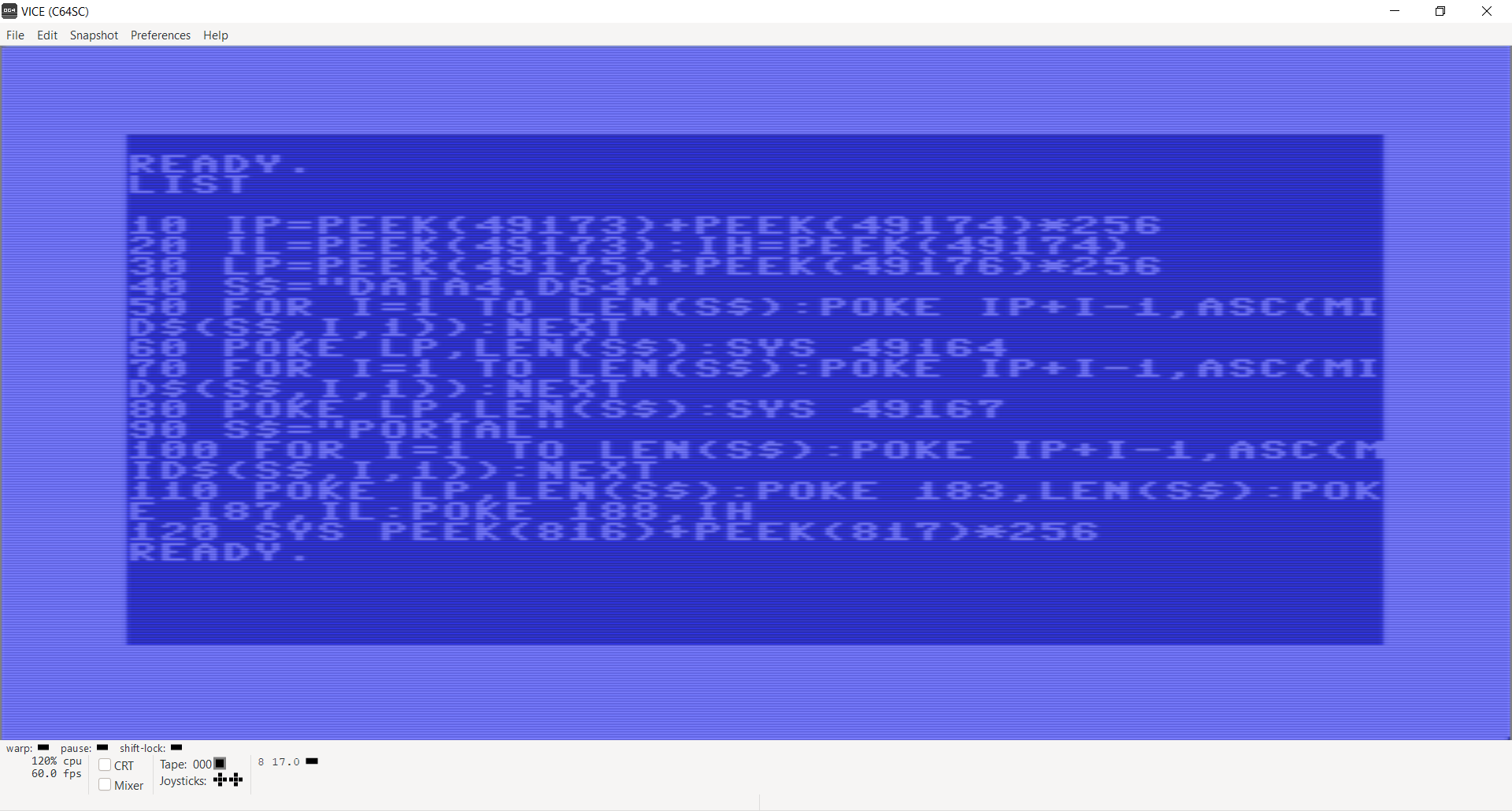
Same BASIC program from the video, but without the print statements:
11/10/2025 - VDRIVE as a Jukebox! The newest floppy resolver join the High Voltage Sid Collection's search and download with PSID64's SID PRG generation allowing users to search for a SID, mount it, and play it without zero copying.
Try out thousands of SIDs on your real C64 or from Vice 3.9!
10/20/2025 – Microsoft has put the
original assembly source code
for BASIC on the 6502 systems on GitHub! Micro-soft BASIC was how a lot of us learned how to program, but it was also the operating system—interactive and compatible with many 8-bit systems of the time.
10/14/2025 - VDRIVE is now fully functional and can search either your local machine or
Commodore.Software for disk images! I will likely make more implementations of the IFloppyResolver for other sites at some point.
Video shows searching Commodore.Software for ASSBLAST (a popular assembler) and it shows 6 results. I then mount the first one disk image from the search (ASSBLAST v3.3) and then load the directory and the first PRG which in turn loads 3 more files through VDRIVE / ILOAD vector.
10/12/2025 - Marc at Commodore.Software gave the green light to build a site-specific CommodoreSoftwareFloppyResolver, and it's now functional!
Huge thanks to Marc for the support!
Also ready is the LocalFloppyResolver which searches a specified set of directories and filtered extentions for floppy images! The C64-side assembly to pass search terms is still in progress, but the resolver is fully functional and testable from C#. Now that the server side is ready I will likely work on VDRIVE assembly next so VDRIVE can mount/unmount floppies!
The project is functional and ready for experimentation, though still evolving.
Pre-built binaries and missing features will be added soon!
10/7/2025 - did not stop coding from the last message buts its now the next day! I have the GitHub repository created will all source code but I need to cleanup a few things before I mark it public.
Whats left (I will likely release this before all of these are done since its functional and still useful)
MOUNT/UNMOUNT not implemented yet but it should take less time to implement than LOAD/SAVE.
Checksums - each chunk will eventully have a checksum vdrive can already request a re-send of last chunk if checksum is wrong
Chunked transfer on SAVE. Right now SAVE does not chunk, it just sends the whole file at once. Should be fairly minor to implement that part.
Hard coded paths and other variables need to be moved to a configuration file.
10/6/2025 - Modified the ESP8266 firmware to be able to run as socket server or to connect as a socket client. This opens some interesting possibilities and I want to try connecting 2 Commodore 64's together so one has to run as a server and one as a client. The BASIC setupwifi PRG that is used to setup the WIFI from C64 will need the changes too to send the extra information if the user wants to run in server or client mode but should be fairly simple additions. The C# has been updated too, and can run as a socket server or connect as a client socket and still serv up the data. Works well and glad to have that one done.
10/5/2025 - Converted the C#.NET to .NET Core so it will run on more hardware. I was thinking about porting to C but decided .NET Core should be fine for now and give me more time to work on other things.Runstop works now too although it only checks after each chunk because it can send back "next chunk", "last chunk", "cancel" are what it can send back to the server now. The error codes are now hooked in too and returns whatever error codes from c1541.exe (with translation) which wil show messages on the C64 side just like a 1541 would although since its a D64 its probably limited to a few errors like ?FILE NOT FOUND ERROR. All of the code is based on what I see the kernal doing during the ILOAD call, mainly what it returns so BASIC does not know the difference. Pagetable made it easy to navigate the calls so hopefully its all correct. I still need to add in checksums on both sides and finish the chunking on the save so its close to being ready for Github and I will provide a link here to that repository soon.
Some interesting locations for ILOAD on PageTables Ultimate Memory Map!
$FFD5 - Kernal LOAD which is just a indirect jmp to $F49E
$F49E - This is the real code from indirect jmp and a few instructions down from this location is the ILOAD indirect call where VDRIVE hooks (jmp ($330)). X/Y are stored to $C3/$C4 and this is alternative address to use if the LOAD includes a ",8" instead of "",8,1". The later uses the first 2 bytes of the file being loaded as the destination address for loading RAM. The original ILOAD code is right here too a few instructions down at $F4A5
$F5AE - The return (RTS) from the original ILOAD $F4A5 - check out the machine language just right before this and it shows what needs to be set to make VDRIVE and other software compatible with the original ILOAD. Set X/Y with the 16 bit end address pointer to what was loaded, and if load was successful, CLC (clear carry) and if there is an error SEC (set carry) and put the error code in the accumulator (A).
10/2/2025 - Update on VDRIVE (what I am calling it for now). VDRIVE can now LOAD/SAVE and show directories. I still need to add the MOUNT/UNMOUNT wedge commands to change D64 floppy images. Added a simple progress spinner so user will know it is executing but might expand that later to show actual numbers.
In the video I load UP9600 and VDRIVE and then in DirMaster I have the same D64 disk open on my laptop. I then add a binary name "toobin" to the disk (forgot to save) and then listed the directory on C64. After noticing toobin was not there I saved the D64 in DirMaster and then loaded toobin on the C64. The numbers at the end are hard to see but it took 38 seconds to transfer 32K which shows about 860 bytes per second but the last second or so is still buffered in the ESP8266 so its likely slightly slower than that. From my understanding a stock 1541 floppy drive can do around 500 bytes a second so even though VDRIVE is no where near as fast as some other methods, it still outpaces the 1541.
I will go over all technical details and code soon but wanted to show its making progress.
9/11/2025 - Early prototype of my Commodore 64 UP9600 VDISK interface that hooks into the ILOAD vector so one can load the directory and files over the WIFI interface! In the video I send a "LOAD "$",8" over the WIFI interface, LIST it, and then LOAD a BASIC PRG. I did a BASIC PRG since it was small but it can also LOAD binaries. In the future I plan on adding SAVE and a wedge that can MOUNT / UNMOUNT D64 disks (I had it hard coded in video). It actually uses c1541.exe from Vice to extract the files so I suppose any disk format will work. Implementing the directory took some time because c1541.exe extracts as a text file (which it should) but the C64 expects the directory to be a BASIC PRG in disguise so I had to generate the PRG directory like a BASIC PRG. Those block numbers are actually the BASIC PRG line numbers and that is just how it worked.
7/1/2025 - Linking my Commodore 64 to Artificial Intelligence! To quickly prototype I just asked the AI to show me Commodore 64 BASIC programs but to prefix them with the letters "PRG" so my code could look for that send it to my C64. It certainly works but the LLM I was using did make syntax error types of mistakes but could correct them. I plan on hooking into CHROUT vector, so that I can pass the text that the C64 prints back to the AI so it will be able to "see" what is going on.
Video shows AI generating a BASIC program and sending it to my C64 through the wireless interface and into the keyboard buffer! I am looking into training a LLM on everything retro to see if I can make it program more complex software. There is a lot of resources out there that can be used to train the LLM.
6/23/2025 - Wirelessly sending C64 PRG files directly into memory or chunking to disk! I created a simple protocol that sends binaries over in "chunks". This buffering pauses the sending of bytes until the C64 request the next chunk allowing the C64 to store the data to disk first and then request the next chunk. This process continues until the file is completely transfered. The chunking is important for checksums, canceling long sends, or other operations that might need to occur.
The path the data takes when sending data from PC is - Socket->ESP8266->Serial Port and vice versa when sending from the C64.
First video shows and early version of the transfer loading Pitfall (about 8K) directly to RAM!
Second video shows the code running in IRQ and placing received bytes in the keyboard buffer so I can control my C64 from my laptop!
Check back soon for more information along with the binaries and source code to try it out yourself!
The following somewhat paradox experiment wrote in C64 BASIC and just simulates typing and then shows C64 memory starting with $0400 which is where the VIC-II (video) chip pulls the bytes for the display. Once it reaches $0428 it will show the first "W" from WELCOME.